
How to convert backslash characters into Japanese Yen signs in Word 2007

To to convert backslash characters into Yen signs in Word 2007, follow these steps:

1. Click the MS Office start button in the top left corner

2. Click Word Options from the bottom of this menu
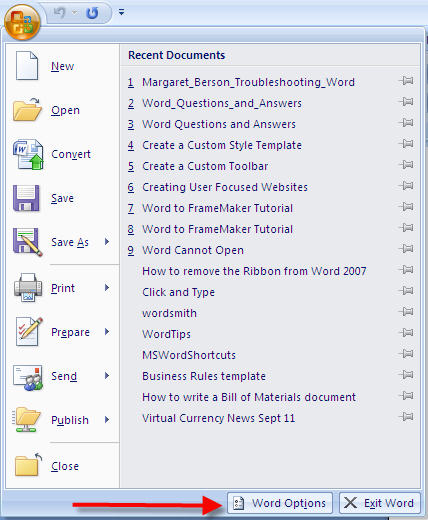
How to convert backslash characters into Yen signs in Word 2007 1

3. Click the Advanced tab on the left

4. Scroll down to the very end of this tab – the very end!

5. Click the + sign next to Layout Options

6. Scroll down to How to convert backslash characters into Yen signs
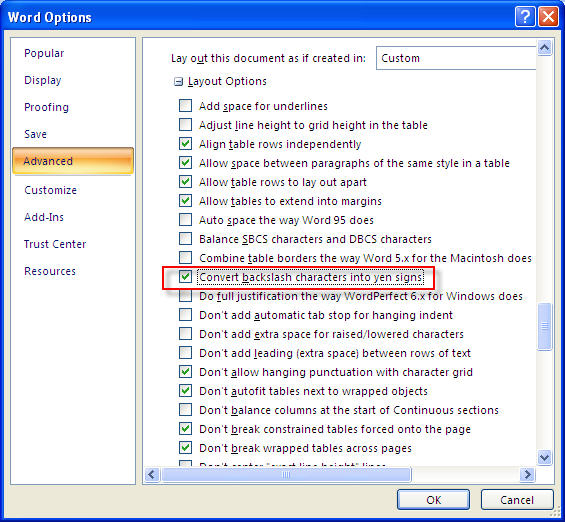
How to convert backslash characters into Yen signs in Word 2007

7. Check this option

8. Click OK

Remember to turn off this option if you want to return to your regular settings.

Related posts:

  1. Change the spacing between characters
  2. How to change the list of document options in Word 2007
  3. How to get rid of Crop Marks in Microsoft Word 2002 / 2003 / 2007
  4. Use Picture Placeholder Settings
  5. How to remove margin marks in Word 2003

{ 1 trackback }

Previous post:

Next post: